Each answer to your intake form becomes a card in Lead
Use cases · Agencies and consultants
Client updates in minutes, not an afternoon.
Keep project notes, deliverables and client updates in one workspace. Share a page with a client as a link, let them send requests through a form, and let an assistant turn the week's notes into the update.
14 days free · no card needed
- Board CRM sales
- Form New client intake
- Pages Proposal and scope of work
- Agent @Reporter
Boards · Team plan and above
Every prospect and project, one column at a time.
Track each prospect from first enquiry to a signed proposal on a board. A card is a full page, so the proposal, the call notes and the deal value sit together, and anyone on the team can see where every deal stands.
LeadQualifiedProposalNegotiationWonLost
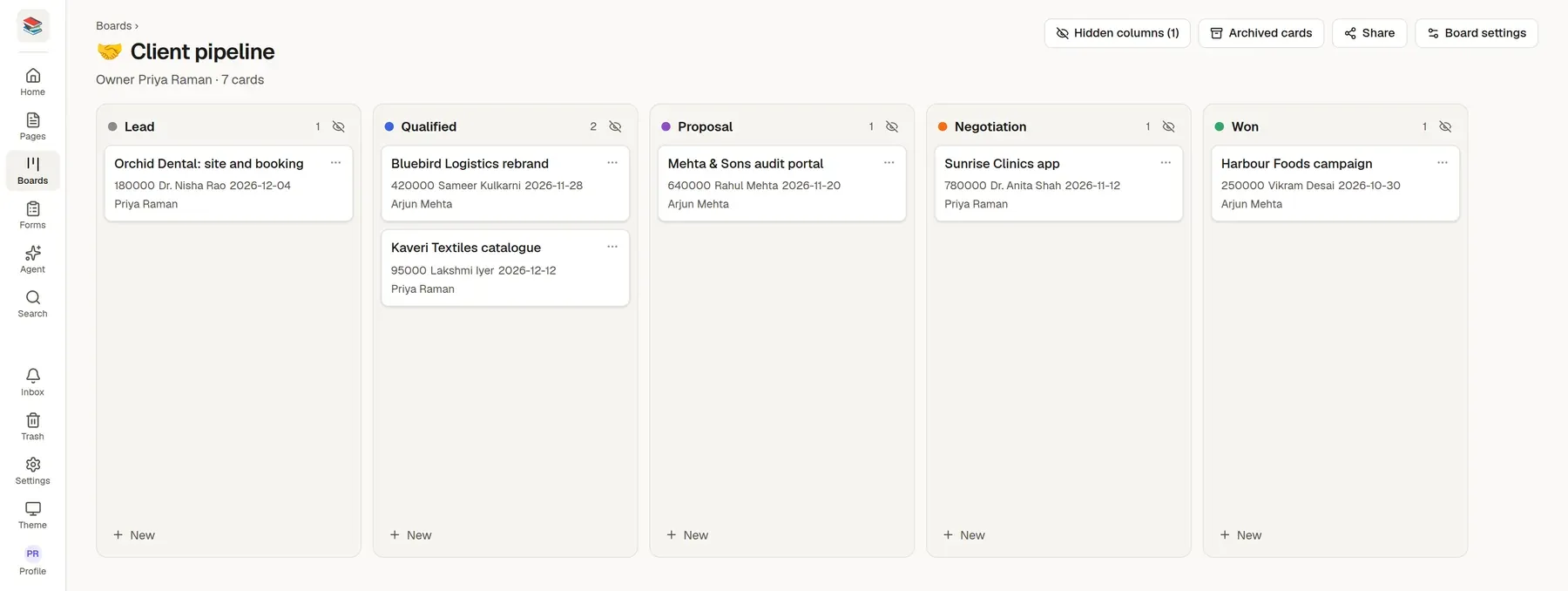
Cards carry deal value, contact, expected close and owner
Move a deal and everyone looking at the board sees it at once
Each card shows deal value, contact, expected close, account owner. Start from the CRM sales board template and change anything.
How teams like yours set it up
One page per client
Start from the Client onboarding template for a new client and the Client status report template for the page they read. Put goals, deliverables and the next steps on it.
Share it as a link
Publish the page and send the link. The client reads it with no account and no sign-up.
Collect requests in a form
Start from the Client change request form template and embed it on the page. Each answer lands in your inbox, and you mark it Handled with a private note.
Agents and pages
Let the log write the update.
Everyone keeps a short daily log. At the end of the week an assistant reads the logs and drafts the client update, with what is done, in progress and next. You edit it and publish.
@Reporter summarise this week's log entries into a client update: done, in progress, next
- A published page is readable by anyone with the link, no account needed
- Comments on selected text, @mentions and page history for your own team
- Signed webhooks send each form answer to the tools you already use
Start from a template
Pick one when you create a page or a form, or ask an assistant to start from it. Change anything afterwards.
Page template
Proposal and scope of work
What you will do for a client, by when, for how much, and on what terms.
Sections
- Goal
- Scope
- Deliverables
- Timeline
- Price
- Terms
Page template
Client status report
A short, regular update: progress, next steps, risks and what you need from the client.
Sections
- Progress this period
- Next period
- Risks and issues
- What we need from you
Form template
New client intake
Who they are, what they need, budget and timing, before the first call.
Questions
- Your name
- Your email
- Company or organisation
- Website
- What do you need help with?
- What does it involve?
- and 3 more
More page templates
- Client onboarding
- Project brief
- Meeting notes
More form templates
- Client change request
- Contact us
Why teams like yours switch
Status updates eat Fridays
Someone collects what happened from five people and five tools, then rewrites it for the client.
Clients live in email and WhatsApp
Requests arrive in threads nobody tracks, so the same question is asked twice.
A per-seat bill for people who only read
Giving every client a login makes the tool cost more than the work it organises.
Try it with your own material
Start a 14-day trial with no card, import a few files and see if it fits.